

A real attack, a real warning, and what you need to know before the next holiday weekend
Introduction
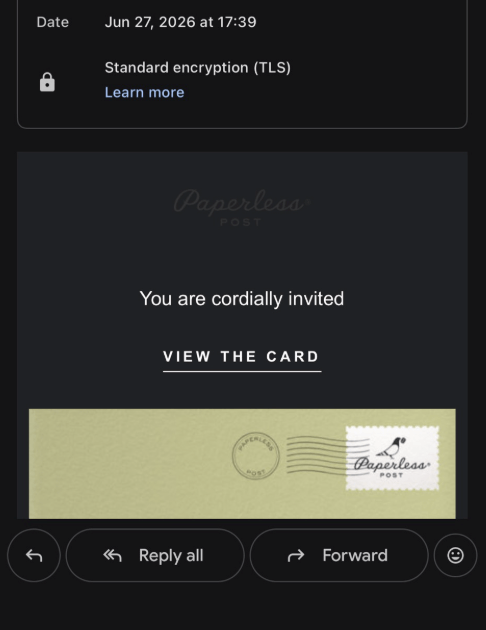
You get an email from a friend. The subject line reads “Special Invitation.” You open it and see what looks like a Paperless Post card, the kind people send for birthday parties and holiday gatherings. The sender is someone you know and trust. The card says “You are cordially invited.” You click “View the Card.”
That’s the trap.
This is the Paperless Post phishing scam. It’s hitting inboxes right now, timed to the Fourth of July weekend when people are sending and receiving party invitations. Our team at Backgrounder caught a live campaign running on the domain geteviteflow.com and found it’s far more sophisticated than your average phishing attempt.
This post breaks down how it works, what the attackers want, and what you should do right now.
How the scam works
Step 1: A trusted friend sends you an invitation
The scam doesn’t start with a stranger. It starts with someone you know — a friend, colleague, or family member — whose email account the attackers have already quietly taken over. They use that person’s real account to send out invitations on their behalf.
Because the email comes from someone you recognize, there are no obvious red flags. No strange sender address. No broken English. No suspicious subject line. It looks normal because it almost is.
Step 2: The email looks exactly like a real Paperless Post
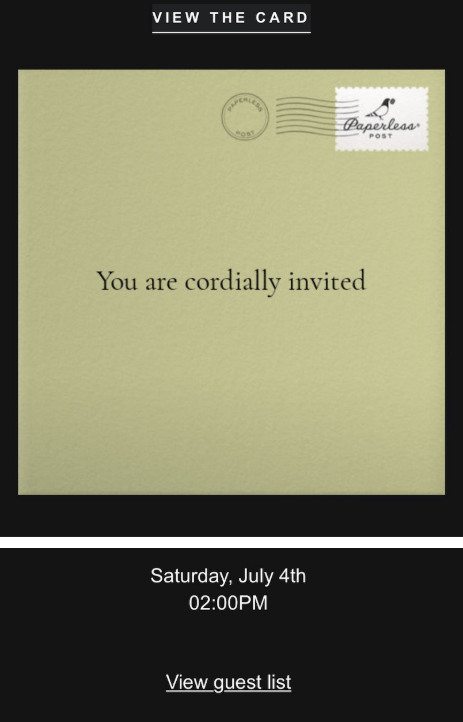
The phishing email closely copies a genuine Paperless Post notification. It shows the logo, a preview of an envelope-style card, and a “View the Card” button. The invitation includes a name, a date, and a time.
Step 3: Clicking takes you to a fake Google sign-in page
When you click “View the Card,” you don’t get a Paperless Post page. You land on a fake Google sign-in page at geteviteflow.com, a domain the attackers control.
The page looks like Google’s real login screen: same logo, same layout, same “Sign in to continue to Gmail” headline. Most people wouldn’t notice anything wrong.
But this is the moment that matters. Type in your Gmail address and password, and you’ve handed your credentials directly to the attackers.
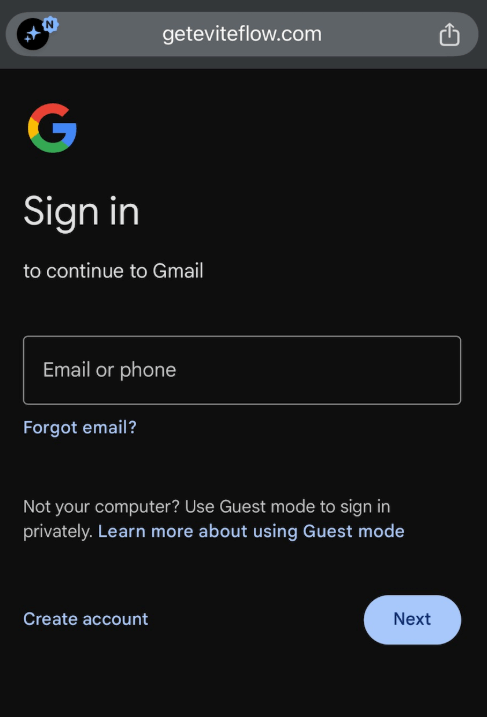
Look at the address bar. The URL is geteviteflow.com, not google.com or accounts.google.com. That’s where the deception falls apart, and it’s the first thing to check.
Step 4: Your credentials are stolen in real time
Whatever you type goes straight to the attackers. Based on our research, stolen credentials are sent to an attacker-controlled Telegram channel. Telegram bots are fast, largely anonymous, and hard to shut down quickly, which is why phishing kits use them.
The whole process takes seconds. By the time you’re wondering why you’re not seeing a party invitation, it’s done.
Step 5: The attackers try to install remote access software
This is what sets this campaign apart. Beyond stealing your Gmail password, the kit also tries to install ScreenConnect on your device.
ScreenConnect is remote access software that IT teams normally use to manage computers. In the wrong hands, attackers can see your screen, control your keyboard and mouse, and access your files. They keep that access even after you change your password.
What the attackers are after
Two things.
First, your Gmail password. With access to your email, attackers can reset passwords for your bank, social media, and work accounts. They can also comb your inbox for anything sensitive.
Second, persistent access to your computer. Even if you catch the breach and change your password, the ScreenConnect installer leaves them a back door. They can keep watching and pulling data for weeks or months.
The combination of credential theft and remote access is the signature of an organized threat actor, not someone fishing randomly.
What our research found
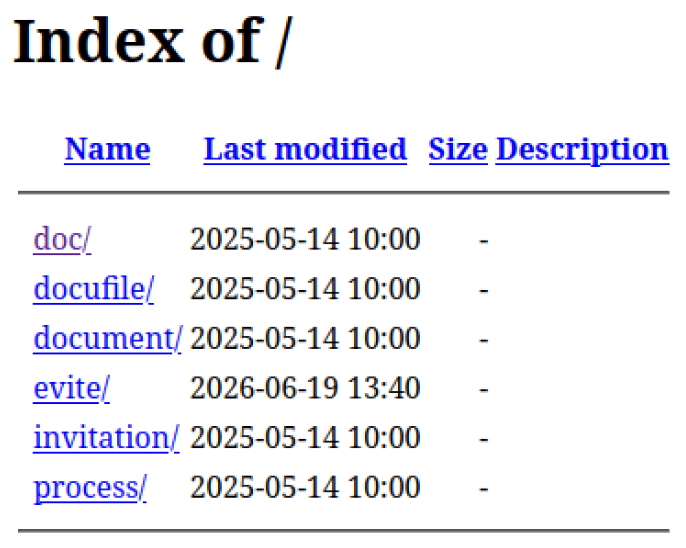
The attacker left the front door open
geteviteflow.com had open directory browsing turned on, so anyone could visit the site and browse its file structure like a shared drive. That exposed the full layout of the phishing kit: /doc/, /evite/, /invitation/, and /process/.
The /evite/ path was last modified on June 19, 2026. The current wave of attacks had been running for over a week before we spotted it.
The attacker accidentally exposed their own email
The phishing kit pre-populated its fake login form with the developer’s own Gmail address: xforgexxcoder22@gmail.com. This was a development artifact left in the live kit. It identified the kit’s author.
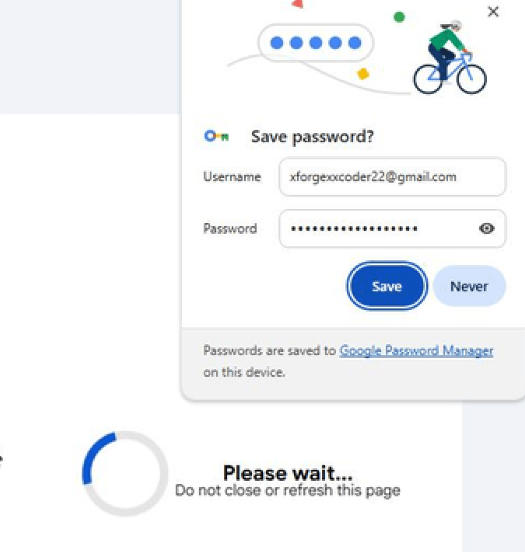
Two email accounts tied to this campaign
Our analysis turned up two addresses:
- donitaturk@gmail.com — used to send the phishing emails. This appears to be a compromised legitimate account now being used for delivery.
- xforgexxcoder22@gmail.com — the kit developer’s account, exposed through the form pre-fill above.
The ScreenConnect installer
The malicious ScreenConnect file has been submitted to VirusTotal.
- SHA1: 19436ee4bfe995317a103c5f26dd29389dca04e9
- Downloading from: oncafari.screenconnect.com
How stolen credentials get out
The phishing kit posts stolen credentials to:
geteviteflow.com/doc/check_telegram_updates.php
Independent research backs up our findings
A detailed technical breakdown is available at: github.com/dendritelab/intelreporting/blob/main/evitreephishingdeepdive.md
A behavioral sandbox analysis: joesandbox.com/analysis/1924593/0/html
Credit to the dendritelab researcher for their independent write-up on this campaign.
What to do if you received this email
If you clicked the link but didn’t enter your password
You’re almost certainly fine. Clicking a link alone doesn’t compromise your account. Close the tab, delete the email, and move on.
One check: did your browser prompt you to download a file? If something started downloading automatically, especially a .exe file, don’t open it and run a malware scan right away.
If you entered your Gmail credentials
Act now.
- Change your Gmail password at myaccount.google.com. Use something new you’ve never used before.
- Check for unknown sessions. Go to Security > Your Devices in your Google Account and sign out of anything you don’t recognize.
- Turn on two-factor authentication. Even with your password, attackers can’t log in if 2FA is active. Use an authenticator app or a hardware key, not SMS.
- Check your Gmail forwarding rules. Attackers often add forwarding rules to silently copy incoming mail. Go to Settings > See all settings > Forwarding and POP/IMAP and remove anything you didn’t create.
- Check for ScreenConnect. If you downloaded and ran a file from this site, contact your IT team or a security professional. You may have remote access software installed that needs expert removal.
- Warn your contacts. If your Gmail was compromised, the attackers may have used it to send this invitation to your address book. Let people know.
If a friend’s account sent you this
Tell them right away. They may not know their account is compromised.
How to spot it before it gets you
- Check the URL, not the logo. Real Google sign-ins only happen at accounts.google.com. Any other domain, no matter how convincing the page looks, is fake.
- Be skeptical of unexpected invitations. Even from people you know. If an invitation asks you to sign in somewhere, text or call the sender to confirm they actually sent it.
- Know that Paperless Post doesn’t ask you to log in to Gmail. Neither does Evite. If an invitation link sends you to a Google login page, that’s the tell.
- Use a password manager. Password managers fill credentials only on the correct domain. They won’t autofill your Gmail password on geteviteflow.com.
- Run link-scanning tools on your email. Tools that analyze embedded links, not just the sender address, can catch campaigns like this one even when they arrive from trusted contacts.
Indicators of compromise
Block or flag these in your security tools.
Malicious domains
- geteviteflow.com
- oncafari.screenconnect.com
Phishing kit URLs
- hxxps://geteviteflow[.]com/doc/check_telegram_updates.php
- hxxps://geteviteflow[.]com/doc/load.php
- hxxps://geteviteflow[.]com/evite/
Associated email addresses
- xforgexxcoder22@gmail.com (kit developer)
- donitaturk@gmail.com (compromised delivery account)
Malicious file
- ScreenConnect.ClientSetup.exe
- SHA1: 19436ee4bfe995317a103c5f26dd29389dca04e9
The bottom line
Phishing works because it exploits trust. This campaign is effective because it starts with a real person’s compromised email and wraps it in a brand people recognize. The attackers put real effort into this. It nearly caught a security professional.
This attack has one clear tell: the URL. If the address bar doesn’t say google.com, don’t type your password.
Share this with anyone who might get a party invitation this weekend. The best defense against this kind of attack is people who know what to look for.
About Backgrounder
Backgrounder helps individuals and organizations detect, understand, and respond to scams. We combine AI, open source intelligence, and security researchers in a set of tools designed to keep you from getting caught out. Learn more at backgrounder.com.
Sources
- DendriteLab independent research: github.com/dendritelab/intelreporting/blob/main/evitreephishingdeepdive.md
- Joe Sandbox behavioral analysis: joesandbox.com/analysis/1924593/0/html
- VirusTotal file analysis (ScreenConnect installer): virustotal.com/gui/file-analysis/NmI3MjI5ZDI3YTA1YWNhNjc0OWQ5NzMwN2UwNTBjZDQ6MTc4MjY3MjExNw==